

Explore the latest AT&T Fiber Plans that start from $55/month and go up to $245 per month. These broadband plans have an expected download speed of 300 Mbps to 5000 Mbps for higher-end plans.
If you’ve been scrolling through cable‑TV bundles, gig‑speed mobile plans, and a maze of “high‑speed” internet offers, you’re not alone. The market is saturated with marketing jargon, and it’s easy to feel overwhelmed when you’re trying to pick a plan that actually delivers on the promise of “fast, reliable, and affordable” internet.
That’s why we’ve put together this deep‑dive on AT&T Fiber Plans—what they cost, what speeds they actually provide, who they’re best for, and how they compare to AT&T’s other broadband options (DSL, fixed‑wireless, and the newer 5G Home Internet). By the end of this post, you’ll have a clear roadmap to decide if AT&T’s fiber service is the right fit for your household, and, if so, which plan will give you the most bang for your buck.
What is AT&T Fiber, and how does it differ from other AT&T Services?
AT&T Fiber is a high-speed internet service powered by fiber-optic technology. Unlike traditional broadband that relies on copper lines, fiber-optic connections transmit data using light, resulting in faster speeds and greater reliability. AT&T Fiber plan delivers speeds up to 5 Gbps in some areas, making it an attractive option for both households and businesses.
| Feature | AT&T Fiber (FTTH) | AT&T Internet (DSL) | AT&T Fixed Wireless | AT&T 5G Home Internet |
|---|---|---|---|---|
| Delivery | Fiber‑to‑the‑home (FTTH) – glass‑fiber cable runs directly to your house | Copper telephone lines (DSL) | Radio signals from a nearby tower to a receiver at your home | Millimeter‑wave 5G signal to a gateway |
| Speed Range | 300 Mbps – 5 Gbps (symmetrical) | 10 Mbps – 100 Mbps (asymmetrical) | 25 Mbps – 300 Mbps (asymmetrical) | 300 Mbps – 1 Gbps (asymmetrical) |
| Latency | 5‑15 ms (ideal for gaming & video calls) | 30‑70 ms | 30‑50 ms | 20‑30 ms (depends on signal strength) |
| Reliability | Very high (no weather‑induced interference) | Moderate (susceptible to line noise) | Moderate (affected by trees, terrain) | Moderate‑high (line‑of‑sight required) |
| Availability | 1.6 M+ U.S. households (growing fast) | Nationwide (but slower) | Rural & suburban “white‑space” areas | Urban & suburban areas with 5G coverage |
| Typical Use Cases | 4K/8K streaming, cloud gaming, remote work, smart home hubs | Light browsing, email, SD streaming | Rural homes lacking fiber or cable | Urban renters who want flexibility |
Bottom line: If your home is in an AT&T Fiber‑served area, you’re looking at a true‑fiber connection—glass‑fiber strands that carry data as light pulses. That translates into symmetric upload/download speeds, ultra‑low latency, and a future‑proof platform that can handle the bandwidth demands of tomorrow’s tech (think VR meetings, AI‑powered home assistants, and multiple 8K TVs).
Advantages of AT&T Fiber Plans:
- Blazing-Fast Speeds: With plans offering speeds ranging from 300 Mbps to 5 Gbps, AT&T Fiber is one of the fastest internet options available. This means less buffering while streaming, smoother online gaming experiences, and faster download/upload times.
- Symmetrical Upload and Download Speeds: Unlike many cable internet providers, AT&T Fiber offers symmetrical speeds, meaning your upload speed is just as fast as your download speed. This is particularly beneficial for content creators, remote workers, and anyone who frequently uploads large files.
- Reliability: Fiber-optic connections are less susceptible to interference from weather or electrical issues, providing a more stable connection than traditional cable or DSL services.
- No Data Caps: With AT&T Fiber, you can enjoy unlimited data, so you don’t have to worry about going over your limit and incurring additional charges.
- Included Equipment: AT&T Fiber plans come with a Wi-Fi gateway at no extra cost, ensuring you have the right hardware to maximize your connection.
AT&T Fiber Plan Line‑up:
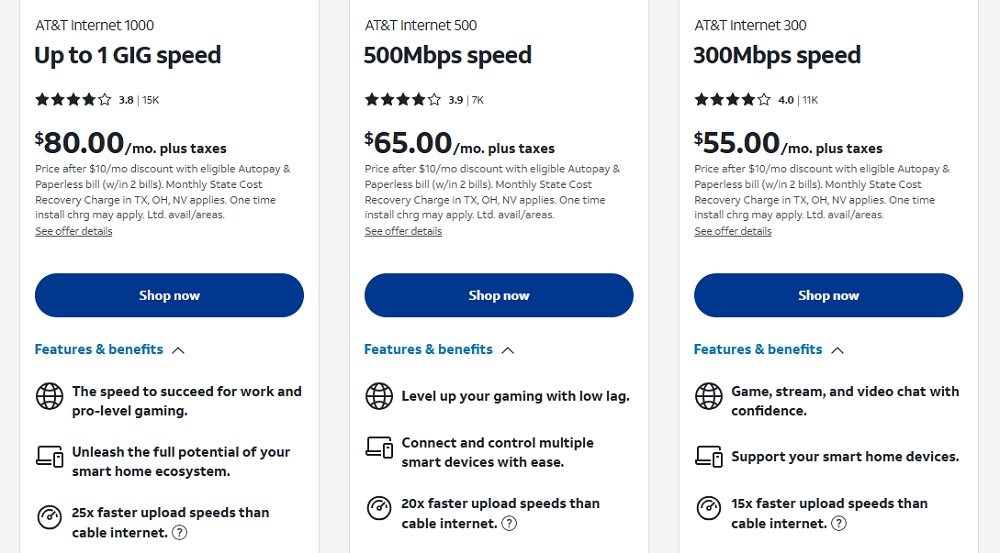
| Plan Name | Download / Upload Speed | Monthly Price* | Data Cap | Ideal For |
|---|---|---|---|---|
| Fiber 300 | 300 Mbps / 300 Mbps | $55 | Unlimited | Small families; 4K streaming, video calls |
| Fiber 500 | 500 Mbps / 500 Mbps | $65 | Unlimited | Medium‑size households; gaming, multiple 4K streams |
| Fiber 1 Gig | 1 Gbps / 1 Gbps | $80 | Unlimited | Power users; work‑from‑home, 8K streaming, smart‑home automation |
| Fiber 2 Gig | 2 Gbps / 2 Gbps | $145 | Unlimited | Tech enthusiasts; multiple gamers, home office with large data transfers |
| Fiber 5 Gig | 5 Gbps / 5 Gbps | $245 | Unlimited | Small businesses, content creators, future‑proofing a “smart home” ecosystem |
*All plans include AT&T Smart Wi‑Fi Home Router (or the newer AT&T Mesh‑Pro System for 2 Gb+ plans) at no extra cost.
What’s the difference between “Fiber 300” and “Fiber 500”?
- Speed: 300 Mbps is already enough for a 4K TV stream plus a few devices browsing or video‑calling. 500 Mbps adds more headroom for simultaneous 4K streams, high‑resolution video conferencing (1080p‑4K), and a few gamers on the same network.
- Upload Symmetry: Both offer identical upload speeds. That matters for creators uploading large files, remote workers sending high‑resolution screen shares, or gamers who want a low‑lag upload path.
- Price Gap: $10 per month – a modest jump for the extra 200 Mbps. Most households find the 300 Mbps plan ample; the 500 Mbps plan shines when you have 5+ active devices streaming or gaming at once.
When do you need 1 Gbps or Higher?
- Home Office Power Users: Large CAD files, 3‑D render uploads, frequent VPN usage.
- Multi‑room 8K/4K Streaming: If you have four or more 4K TVs + a 8K TV.
- Gaming Households: Multiple consoles/PCs playing online simultaneously.
- Future‑Proofing: If you anticipate adopting AI‑driven services, cloud gaming (e.g., Xbox Cloud Gaming, NVIDIA GeForce Now), or VR/AR experiences that demand ultra‑low latency and high bandwidth.
Availability of AT&T Fiber in your neighborhood:
AT&T’s fiber footprint has expanded dramatically over the past five years:
- 2022: 1.0 M households
- 2023: 1.2 M households
- 2024: 1.4 M households (including major metro areas like Atlanta, Dallas, Denver, Tampa, and the Pacific Northwest)
- 2025: 1.56 M households (ongoing rollout to rural “mid‑size” towns)
How to check:
- Visit att.com/internet/fiber.
- Enter your ZIP code or street address.
- If fiber isn’t listed, you may still be eligible for AT&T Fixed Wireless or 5G Home Internet—both of which use AT&T’s network but are not true fiber.
Pro tip: In areas where fiber is “pending,” sign up for the “Waitlist Notification”. AT&T often offers a $25 credit to early adopters who agree to be part of the rollout.
The Pros & Cons of AT&T Fiber:
✅ Pros
| Reason | Detail |
|---|---|
| Symmetric Speeds | Upload equals download—critical for content creators, cloud backups, and video conferencing. |
| Ultra‑Low Latency | 5‑15 ms latency makes it ideal for competitive gaming and real‑time remote work. |
| Unlimited Data | No data caps—no throttling after 250 GB like some cable ISPs. |
| Future‑Proof | Infrastructure can easily scale to 10 Gbps+ as technology evolves. |
| Bundling Flexibility | Combine with AT&T TV, phone, and mobile plans for discounts. |
| Customer Support | 24/7 chat, phone, and in‑store assistance; generally higher satisfaction score than legacy DSL. |
❌ Cons
| Reason | Detail |
|---|---|
| Limited Availability | Still not nationwide; many rural areas rely on DSL or 5G. |
| Price Premium | Higher‑speed plans (2 Gb, 5 Gb) cost more than comparable cable bundles. |
| Equipment Rental (for some bundles) | While the base router is free, Mesh‑Pro node rentals can add $30‑$40/month. |
| Installation Wait Times | In high‑demand markets, professional install appointments may be 2‑4 weeks out. |
How to choose the right AT&T Fiber Plan for your household?
- Count Your Devices
- Rule of thumb: 1 Gbps can comfortably handle 10‑12 active 4K streams or 30‑40 typical web‑browsing devices.
- If you have ≤4 devices, Fiber 300 is likely enough.
- Identify Your Primary Use Cases
- Streaming 4K/8K: 300 Mbps is fine for 1‑2 streams.
- Gaming + Streaming: 500 Mbps+ reduces the risk of buffering.
- Remote work with large uploads (video editing, CAD): Aim for 1 Gbps or higher.
- Future‑Proofing
- If you plan to add smart‑home devices, home‑office expansion, or VR/AR gear in the next 2‑3 years, opt for Fiber 500 or 1 Gbps now to avoid a costly upgrade later.
- Budget vs. Performance
- Compare the monthly cost difference with the additional speed you actually need.
- Example: Upgrading from 300 Mbps to 500 Mbps costs about $15/month → $180/year. If that extra 200 Mbps prevents you from hiring a second ISP for a gaming PC, the ROI is immediate.
- Check for Bundles & Promotions
- If you already have an AT&T mobile plan (e.g., Unlimited Elite), see if you qualify for a $20‑$30/month discount on fiber.
The Installation Process – What to expect:
- Online Order / Phone Call
- Choose your plan, confirm address, and schedule a preferred installation window.
- Self‑Install Kit (If Available)
- AT&T ships a Fiber ONT (Optical Network Terminal), Ethernet cable, and a Wi‑Fi router.
- You’ll need a small drill, a screwdriver, and a basic understanding of where your home’s main fiber line enters (usually in the basement or utility closet).
- Professional Install (Most Common)
- A technician arrives, runs a fiber line from the street to your ONT, configures the router, and runs a quick speed test.
- Installation time: 45‑90 minutes.
- Activation & Testing
- After setup, AT&T’s system automatically provisions the service.
- You’ll receive a welcome email with login credentials for the AT&T Wi‑Fi app where you can manage devices, set up a guest network, and enable parental controls.
- First‑Month Billing
- Any promotional discounts (e.g., “$10 off for 12 months”) are applied automatically.
Tips for a Smooth Install:
- Clear Access: Make sure the technician has clear access to where the fiber enters the house and the central location for the ONT.
- Have Power Outlets Ready: The ONT and router need nearby outlets; plan for a short extension cord if needed.
- Ask About Wi‑Fi Mesh: If you have a large home (over 2,500 sq ft), request the Mesh‑Pro system for better coverage.
Troubleshooting common issues:
| Symptom | Quick Fix | When to Call Support |
|---|---|---|
| Slow speeds on a specific device | Restart router, move device closer to router, disconnect other devices | If speed remains <50 % of plan after 10 min |
| Frequent Wi‑Fi drops | Reboot router, switch to 5 GHz band, enable “Band Steering” in the app | If issue persists >3 days |
| No internet after power outage | Power‑cycle ONT (unplug for 30 sec), wait for lights to stabilize | If ONT lights stay red or orange |
| High latency during gaming | Connect console/PC via Ethernet, enable QoS for gaming in router settings | If latency stays >80 ms |
| Installation still pending after 2 weeks | Use the online “track order” portal or call 1‑800‑331‑0500 | If no update after 5 business days |
AT&T’s 24/7 live chat is often the fastest route for non‑urgent issues; the phone line is best for hardware replacement or when you need a technician onsite.
Frequently Asked Questions (FAQ)
Q1. Do AT&T Fiber plans have data caps?
No. All AT&T Fiber plans come with unlimited data, so you won’t be throttled for streaming movies or uploading large files.
Q2. Is a contract required?
For promotional pricing, AT&T typically asks for a 12‑month agreement. You can switch to month‑to‑month later, but expect a price increase of $10‑$20/month.
Q3. Can I keep my existing landline phone?
Yes. AT&T offers a Digital Home Phone service that works over the fiber line for an additional $30/month (unlimited local and long‑distance). You can also keep a separate traditional PSTN line if you prefer.
Q4. How does AT&T Fiber handle multiple households in the same building?
In multi‑unit buildings (apartments, condos), AT&T can deploy “fiber to the building” (FTTB) with individual ONTs for each unit. Pricing is similar, but installation may involve coordination with property management.
Q5. What if I move?
If you break your lease early, AT&T may charge an early termination fee (ETF) of $100‑$200, depending on the contract length. However, you can often transfer the service to a new address (subject to availability) and avoid the fee.
Bottom Line – Should you subscribe to AT&T Fiber?
- If you live in a served area and need reliable, symmetric high‑speed internet for work, gaming, or a media‑heavy household, AT&T Fiber is a solid, future‑proof choice.
- If your budget is tight and you only use the internet for basic browsing and occasional streaming, the Fiber 300 plan offers excellent value at $55/mo.
- If you’re a tech enthusiast or remote‑worker handling large uploads, the Fiber 1 Gbps or 2 Gbps tiers give you the headroom you’ll appreciate today and tomorrow.
- If you’re renting or live in a non‑served area, consider AT&T 5G Home Internet as a flexible alternative—just be aware of potential line‑of‑sight issues.
Final recommendation: Run a quick speed test on your current connection. If you’re consistently hitting <30 Mbps and see latency spikes above 100 ms, upgrade to AT&T Fiber. The performance boost alone usually pays for itself in increased productivity and smoother entertainment experiences.
Ready to upgrade? Here’s how to get started:
- Check Availability – Go to
att.com/internet/fiberand enter your address. - Select a Plan – Choose the speed tier that matches your needs (300, 500, 1 Gb, etc.).
- Pick a Bundle (Optional) – Add AT&T TV or Phone for extra savings.
- Schedule Installation – Choose a self‑install kit (if eligible) or a professional appointment.
- Enjoy Ultra‑Fast Internet! – Log into the AT&T Wi‑Fi app, set up your network, and start streaming, gaming, and working at fiber speed.
Conclusion:
AT&T Fiber plans offer some of the best internet options available, especially for those who prioritize speed and reliability. With a range of plans to choose from, there’s likely an option that fits your household’s needs. As technology continues to evolve, investing in a fiber-optic internet service can future-proof your home or business. So, if you’re tired of slow internet speeds and frequent interruptions, consider making the switch to AT&T Fiber for a smoother online experience. Happy browsing!
You may check: AT&T Internet 300 | AT&T Internet 500 | AT&T Internet 1000 | AT&T Internet 2000 | AT&T Internet 5000
View AT&T Wireless Unlimited Plans
AT&T Official Plan details: Click Here
Disclosure: This blog post is for informational purposes only. Pricing and features may vary based on location and promotions. Always verify details with AT&T’s official resources.